Jetpack Monitor
Un tool essenziale per chi gestisce e-commerce. Ti avvisa immediatamente se il tuo sito perde la connessione con Jetpack o Woo Payments, prevenendo perdite di vendite dovute a malfunzionamenti del gateway.
Scarica il Plugin
Cosa fa questo plugin?
Alert in Tempo Reale
Ricevi notifiche via email o webhook non appena viene rilevata una disconnessione.
Log Dettagliati
Mantieni uno storico delle connessioni e disconnessioni per diagnosticare problemi ricorrenti.
Heatmap
Tieni sotto controllo visivamente tutte le disconnessioni e la loro durata nel tempo.
Leggero e Sicuro
Impatto zero sulle performance del sito, gira in background in modo efficiente.
Descrizione
Non perdere mai più vendite a causa di guasti del sistema di pagamento!
StSft Jetpack Connection Monitor è il tuo cane da guardia 24/7 per i sistemi di pagamento critici del tuo e-commerce. Monitora continuamente vari componenti di pagamento e ti invia un avviso email unificato non appena qualcosa va storto.
Cosa viene monitorato
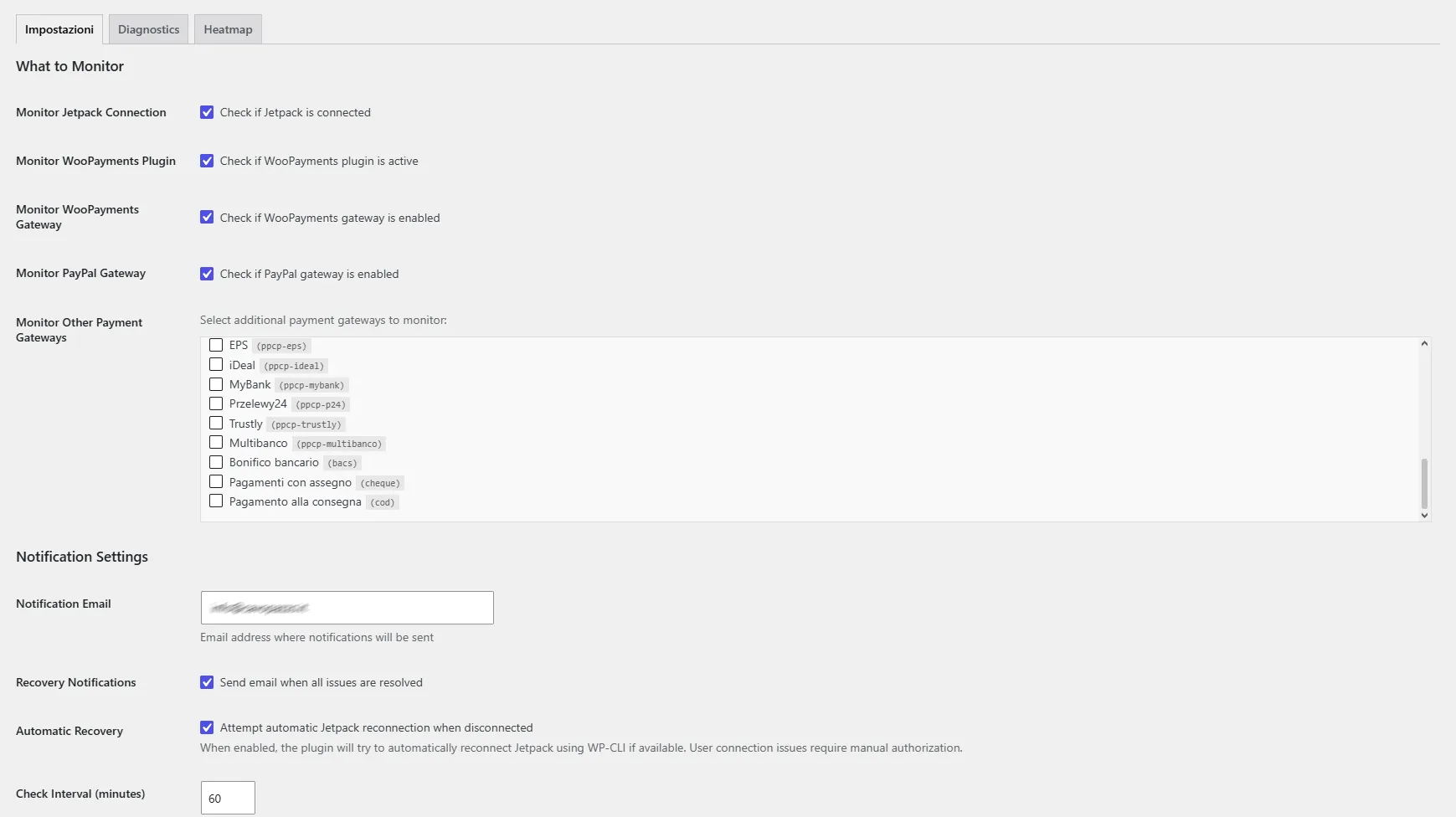
Il plugin può monitorare questi sistemi critici:
- 💳 Connessione Jetpack - Essenziale per la funzionalità di WooPayments
- 🔌 Plugin WooPayments - Deve essere attivo per l'elaborazione delle carte di credito
- 💰 Gateway WooPayments - Deve essere abilitato nelle impostazioni di WooCommerce
- 🅿️ Gateway PayPal - Il tuo metodo di pagamento di riserva
Perché questo plugin è essenziale
Se gestisci un negozio WooCommerce, i guasti ai sistemi di pagamento possono costarti vendite immediate:
- Jetpack si disconnette → WooPayments smette di funzionare
- Il plugin WooPayments viene disattivato per sbaglio → Nessun pagamento con carta di credito
- Il gateway di pagamento viene disabilitato → I clienti non possono completare l'acquisto
- Non sai che c'è un problema finché i clienti non si lamentano (o abbandonano)
Questo plugin ti avvisa istantaneamente, in modo che tu possa risolvere i problemi prima di perdere le vendite.
Caratteristiche Principali
- ⚡ Avvisi Istantanei - Notifica via email entro pochi minuti dal rilevamento dei problemi
- 🔮 Monitoraggio Preventivo - Avvisa prima che i problemi causino disconnessioni
- 🔧 Recupero Automatico - Tenta la riconnessione automatica (potenziato con WP-CLI)
- 📊 Diagnostica Completa - Dashboard sulla salute del sistema in tempo reale
- 📧 Email Unificata - Un'unica email che elenca tutti i problemi (niente spam con mille email separate)
- ✅ Notifiche di Ripristino - Email opzionale quando i sistemi tornano online
- 🎯 Configurabile - Scegli quali sistemi monitorare
- ⏰ Pianificazione Flessibile - Controlla ogni 5-1440 minuti (scegli tu)
- 📱 Widget Dashboard - Stato in tempo reale di tutti i sistemi monitorati
- 📝 Log Dettagliati - Cronologia di tutti i controlli per un debug approfondito
- 🌍 Completamente Tradotto - Italiano e Inglese inclusi
- 🧪 Funzioni di Test - Controllo manuale e test di invio email
Installazione
Installazione Manuale
- Scarica il file ZIP del plugin
- Vai su WordPress admin → Plugin → Aggiungi nuovo plugin → Carica plugin
- Scegli il file ZIP e clicca "Installa ora"
- Clicca su "Attiva plugin"
- Vai su Impostazioni → Jetpack Monitor per configurarlo
Configurazione
Opzioni di Monitoraggio
Monitoraggio Connessione Jetpack
- Controlla se Jetpack è connesso a WordPress.com
- Critico per la funzionalità di WooPayments
Monitoraggio Plugin WooPayments
- Verifica che il plugin WooPayments sia installato e attivo
- Rileva se il plugin è stato disattivato accidentalmente
Monitoraggio Gateway WooPayments
- Controlla se il gateway di WooPayments è abilitato su WooCommerce
- Individua le modifiche alla configurazione
Monitoraggio Gateway PayPal
- Verifica che il gateway di pagamento PayPal sia abilitato
- Assicura che il metodo di pagamento di riserva sia funzionante
Impostazioni Notifiche
Email di Notifica
- Indirizzo email per ricevere gli avvisi
- Può essere diverso dall'email di amministrazione di WordPress
Notifiche di Ripristino
- Abilita per ricevere un'email quando tutti i problemi sono risolti
- Aiuta a confermare che i problemi sono stati fixati
Intervallo di Controllo
- Con che frequenza controllare i sistemi (5-1440 minuti)
- Consigliato: 15-30 minuti per negozi attivi
Gallery